
Never lose a warranty again — the 2026 playbook
Manufacturer warranties are quietly one of the most underused safety nets in your household. The average two-year extended warranty pays out about $300–$1,800 over its life — but only if you can produce three things: the original receipt, the warranty terms, and the serial number. The problem isn't that warranties fail you. The problem is that you fail to find them in time.
Why receipts get lost (every time)
The default storage strategy goes like this: you buy something, the receipt goes in a wallet or a kitchen drawer, and twelve months later you can't find it. The reasons are predictable:
- Thermal paper fades. Most retail receipts are printed on heat-sensitive paper. Within 12-18 months at room temperature, the ink visibly degrades.
- Email goes stale. Digital receipts get buried under marketing emails. Search relies on remembering the exact store name. (Was it "Best Buy" or "BestBuy.com"?)
- Boxes go to recycling. The serial number is on the box. You threw the box away.
- Warranty cards never go anywhere useful. They sit in a drawer because filing them feels boring.
The 5-minute setup that changes everything
Here's the playbook that actually holds up over years:
1. Capture at the moment of purchase
The instant you bring something home — laptop, washing machine, jewelry, power tool — take three photos: the receipt, the warranty card or terms, and the serial number / model plate. That's it. Don't sort. Don't categorize. Just capture.
2. Use OCR, not folders
Photo folders fail at scale. Past 30 items, scrolling through "IMG_4231" is hopeless. You need a tool that reads the text in the receipt and lets you search for "Sony" or "Best Buy" or "March 2025". Modern OCR is good enough — Apple Vision in iOS 17 can extract storefront, date, total, and warranty term from a typical retail receipt with no cloud round-trip.
3. Set the reminder when you save the warranty
The single biggest reason people don't claim warranty repairs isn't the warranty terms — it's that they remember it three weeks after it expires. Set a reminder for 30 days before the end date. Not 7 days. Thirty. Some warranty claims require return-by-mail and the parts inspection alone takes two weeks.
4. Keep the proof package in one place
When you actually file a warranty claim, you'll want: photos of the item, the receipt, the warranty terms, the serial number, and (if you have it) the original box. Store them together, linked to the item — not scattered across your photo library, email inbox, and a kitchen drawer.
The cheapest insurance is paperwork you can find.
5. Back it up — but only to yourself
This is where most "receipt scanner" apps fail. They copy your receipts to their server. Now your purchase history — including how much you spent, where, and on what — is on someone else's database, often a startup with a 50% chance of being acquired or shut down within five years. Use a tool that keeps the data on your device and (optionally) syncs through your own iCloud account.
What HomeProof does
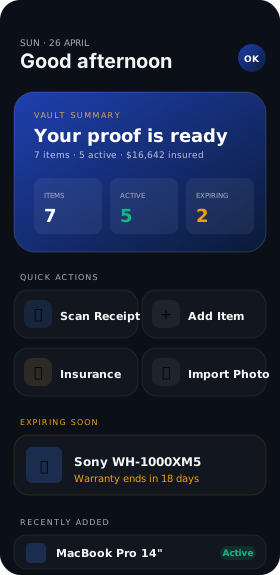
HomeProof was built around exactly this playbook. You scan a receipt, OCR runs on your iPhone (no server), and the app extracts:
- Store name — pulled from the receipt header
- Purchase date — recognized in MM/dd/yyyy or dd/MM/yyyy
- Total amount — including USD, GBP, EUR currency detection
- Warranty duration — when written on the receipt ("2-year warranty")
- Serial number — when prefixed with "S/N" or "Serial:"
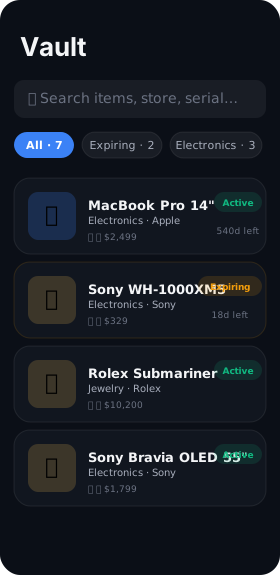
You confirm the fields, add a photo of the item, and the warranty reminder is scheduled automatically — 30 days before the end date by default, fully configurable. When something breaks, you tap once to see the full proof package: receipt, photos, serial, warranty card, end date.
What it costs
Free for up to 20 items. $19.99 a year for unlimited items, the Insurance Report PDF generator, and cloud backup across all your devices. (For context: AppleCare+ on a single MacBook is $199 a year. The math works.)
Ready to stop losing warranties?
HomeProof is free to download and free for your first 20 items.
Download on the App Store